Unreal: 라인 트레이스로 간단한 샷건 만들기
전에는 라인 트레이스를 사용하는 법을 알아봤고, 이번엔 그를 이용해 샷건을 한번 만들어보자.
1
2
3
4
5
6
7
8
9
10
11
12
13
14
15
16
17
18
19
20
21
22
23
24
25
26
27
28
29
30
31
32
33
34
35
36
37
38
39
40
41
42
43
44
45
46
47
48
49
50
51
52
53
54
55
56
57
58
59
60
61
62
63
64
65
66
67
68
69
70
71
72
//WeaponBase.h

#pragma once

#include "CoreMinimal.h"
#include "GameFramework/Actor.h"
#include "WeaponBase.generated.h"

class UArrowComponent;
UCLASS()
class NBCUNREALBASIC_API AWeaponBase : public AActor
{
	GENERATED_BODY()

public:
	// Sets default values for this actor's properties
	AWeaponBase();

	void UseWeapon(FVector FireLocation, FVector FireVector);

	bool HasRecoil() { return bHasRecoil; }
	float GetRecoilPerShot() { return RecoilPerShot; }

protected:
	// Called when the game starts or when spawned
	virtual void BeginPlay() override;

	UPROPERTY(EditAnywhere, BlueprintReadOnly, Category = Weapon)
	TObjectPtr<USceneComponent> SceneComp;

	UPROPERTY(EditAnywhere, BlueprintReadOnly, Category = Weapon)
	TObjectPtr<UStaticMeshComponent> MeshComp;

	//Shot Trace
	UPROPERTY(BlueprintReadWrite)
	bool CanFire;
	UPROPERTY(EditAnywhere, BlueprintReadOnly, Category = Weapon)
	float MOA;				//How much is concentrated
	UPROPERTY(EditAnywhere, BlueprintReadOnly, Category = Weapon)
	float MaxDistance;				//How much is concentrated
	UPROPERTY(EditAnywhere, BlueprintReadOnly, Category = Weapon)
	bool bAlwaysShotCenter;	//Whether to always shot the aiming point at the first shot
	UPROPERTY(EditAnywhere, BlueprintReadOnly, Category = Weapon)
	bool bIsLineTracing;	//Whether using linetrace or sweeptrace
	UPROPERTY(EditAnywhere, BlueprintReadOnly, Category = Weapon)
	bool bUsingGravity;		//whether it's affected by gravity, not availiable when linetracing

	//Ammo
	UPROPERTY(EditAnywhere, BlueprintReadOnly, Category = Weapon)
	int32 AmmoPerFire;	//How many bullets to fire on a single shot
	UPROPERTY(VisibleInstanceOnly, BlueprintReadOnly, Category = Weapon)
	int32 CurrentAmmo;			//How many ammos are in the mag
	UPROPERTY(EditAnywhere, BlueprintReadOnly, Category = Weapon)
	int32 MaxAmmo;				//How many ammos to have in a single mag
	UPROPERTY(EditAnywhere, BlueprintReadOnly, Category = Weapon)
	TSubclassOf<AActor> AmmoClass;	//Bullet actor to use when not linetracing.

	//Recoil
	UPROPERTY(EditAnywhere, BlueprintReadOnly, Category = Weapon)
	bool bHasRecoil;		//whether to has recoil
	UPROPERTY(EditAnywhere, BlueprintReadOnly, Category = Weapon)
	float RecoilPerShot;		//How much to recoil

	//Damage
	UPROPERTY(EditAnywhere, BlueprintReadOnly, Category = Weapon)
	float DamagePerBullet;		//Damage to apply per bullet.
	UPROPERTY(EditAnywhere, BlueprintReadOnly, Category = Weapon)
	float DamageAttenuationRate;		//how much to decrease damage by distance.
	UPROPERTY(EditAnywhere, BlueprintReadOnly, Category = Weapon)
	float MaxDamageDistance;		//where the others to start taking maximum damage.

};
1
2
3
4
5
6
7
8
9
10
11
12
13
14
15
16
17
18
19
20
21
22
23
24
25
26
27
28
29
30
31
32
33
34
35
36
37
38
39
40
41
42
43
44
45
46
47
48
49
50
51
52
53
54
55
56
57
58
59
60
61
//WeaponBase.cpp
#include "WeaponBase.h"

#include "Components/ArrowComponent.h"
#include "Kismet/KismetSystemLibrary.h"
#include "Kismet/GameplayStatics.h"
#include "Engine/DamageEvents.h"
// Sets default values
AWeaponBase::AWeaponBase()
{
 	// Set this actor to call Tick() every frame.  You can turn this off to improve performance if you don't need it.
	SceneComp = CreateDefaultSubobject<USceneComponent>(TEXT("SceneComp"));
	RootComponent = SceneComp;
	MeshComp = CreateDefaultSubobject<UStaticMeshComponent>(TEXT("MeshComp"));
	MeshComp->SetupAttachment(RootComponent);
	FirePoint = CreateDefaultSubobject<UArrowComponent>(TEXT("FirePoint"));
	FirePoint->SetupAttachment(RootComponent);

	AmmoPerFire = 1;
	CurrentAmmo = 0;
	MaxAmmo = 12;
	MOA = 10.f;
	MaxDistance = 1000.f;
	DamagePerBullet = 100.f;
}

void AWeaponBase::UseWeapon(FVector FireLocation, FVector FireVector)
{
	UE_LOG(LogTemp, Warning, TEXT("Firing the weapon, %s"), *GetName());
	FHitResult HitResult;
	TArray<AActor*> ActorsToIgnore;
	ActorsToIgnore.Add(this);
	ActorsToIgnore.Add(Owner);
	float SpreadAngle = FMath::Atan(MOA * 0.02908f / 100.f);
	for (int i = 0; i < AmmoPerFire; i++) {
		FVector ShootDirection = FMath::VRandCone(FireVector, SpreadAngle);
		bool bHit = UKismetSystemLibrary::LineTraceSingle(
			GetWorld(),
			FireLocation,
			FireLocation + ShootDirection * MaxDistance,
			UEngineTypes::ConvertToTraceType(ECC_Visibility),
			false,
			ActorsToIgnore,
			EDrawDebugTrace::ForDuration,
			HitResult,
			true,
			FLinearColor::Red,
			FLinearColor::Green,
			2.0f);
		if (bHit && IsValid(HitResult.GetActor())) {
			float DamageToApply = HitResult.Distance < (MaxDamageDistance) ?
				DamagePerBullet :
				FMath::Max(0, DamagePerBullet - DamageAttenuationRate * (HitResult.Distance - MaxDamageDistance));
			UE_LOG(LogTemp, Warning, TEXT("Applying %f Damage to %s !"), DamageToApply, *HitResult.GetActor()->GetName());


			float temp = UGameplayStatics::ApplyDamage(HitResult.GetActor(), DamageToApply, Cast<APawn>(Owner)->GetController(), Owner, UDamageType::StaticClass());
			UE_LOG(LogTemp, Warning, TEXT("returned damage to %f !"), temp);
		}
	}
}
무기의 기본이 될 WeaponBase클래스에서 임시로 구현해봤다. 무기를 사용시 호출될 UseWeapon()에서는 사전에 설정된 값에 따라 라인트레이스로 사격을 진행한다. 탄환의 밀집도인 MOA값에 따라 역삼각함수를 이용해 분산의 각도로 변환하고, 이를 VRandCone을 이용해 랜덤한 방향으로 틀어준다. 그리고 주어진 위치에서 해당 방향으로 라인트레이스를 진행한다. 이를 한번에 쏠 총알인 AmmoPerFire만큼 반복하며, 맞은 대상이 존재하면 데미지를 거리에 따라 계산해 ApplyDamage()를 호출한다. 당장은 피격당할 액터가 따로 없으니 호출되더라도 데미지 처리가 되진 않을 것이다. 항상 중앙을 쏠 것인지등 나중에 쓸 것 같아 선언해둔 변수들도 있는데, 추후에 구현해야 할 것 같다.
캐릭터 입력을 연동해 발사해보면 잘 발사되는 것을 알 수 있다. 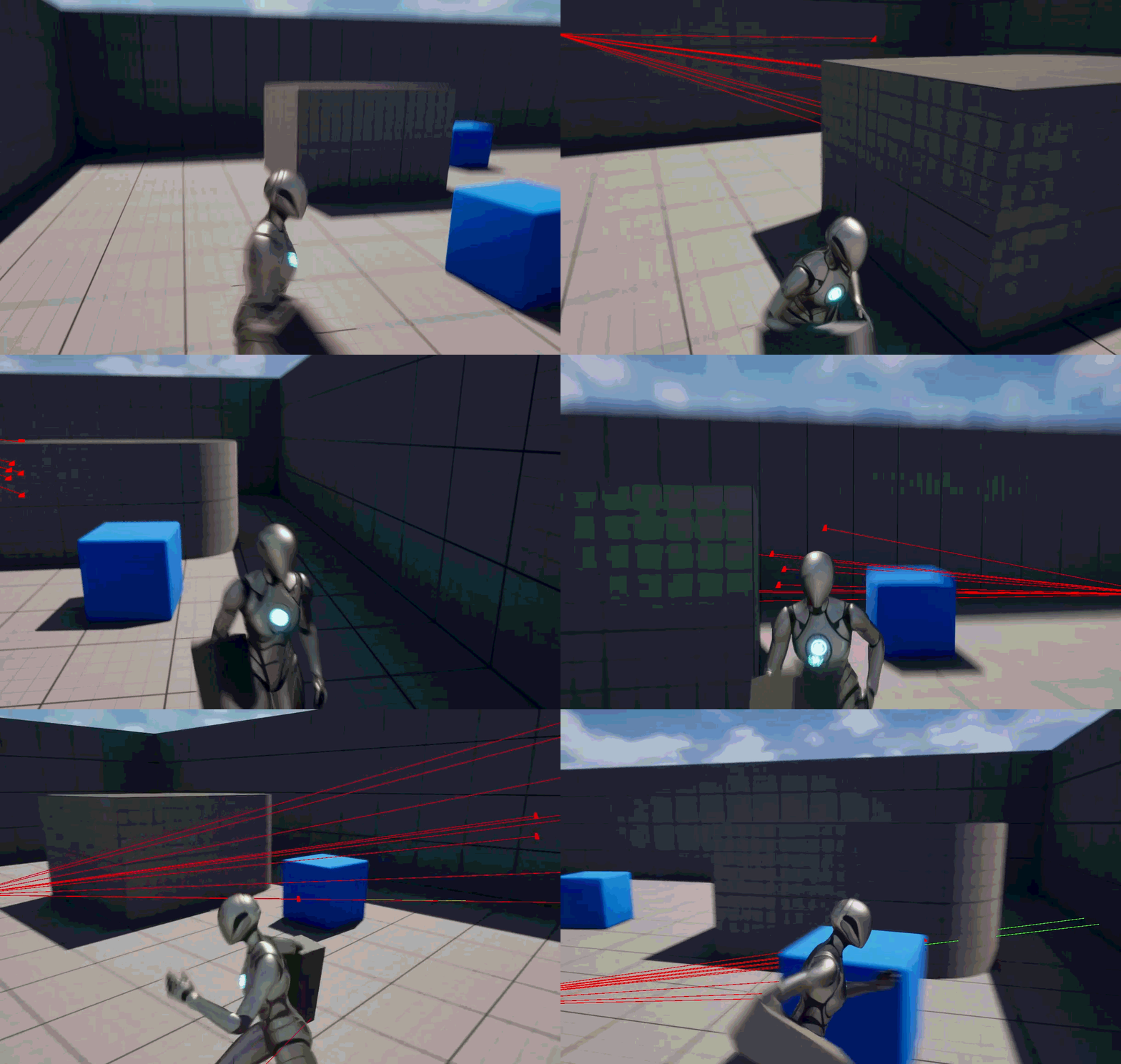
This post is licensed under CC BY 4.0 by the author.